Our Mission
Social media has undergone a major transformation
Partners
We are parters with industry leaders
Customers
Updating brand assets across accounts is a nightmare.
Our Mission
Social media has undergone a major transformation
Partners
We are parters with industry leaders
Customers
Updating brand assets across accounts is a nightmare.
Our Mission
Social media has undergone a major transformation
Partners
We are parters with industry leaders
Customers
Updating brand assets across accounts is a nightmare.
How to Manage Access to an Instagram Business Account [2026 Guide]
Learn how to manage access to an Instagram Business account in this guide. Audit users, assign roles safely, remove outdated access, and prevent takeover risks.

handles.org Newsroom Team
Written by

Quick Summary
Managing access to your Instagram Business account is critical to protect your brand from security risks, data loss, and unauthorized content. In this guide, you’ll learn how to audit user permissions, assign secure roles, remove old access, and prevent takeovers. You’ll also learn how AI-powered tools like Handles can automate your social media security.
Feel Like Too Many People Control Your Instagram?
If your Instagram feels like it has too many cooks in the kitchen, you’re not alone. Many business owners discover old employees, agencies, or freelancers still have access to their accounts months after projects end.
This creates major risks:
Former staff members can still post (or worse).
Agencies have lingering admin rights.
No one’s sure who can change what.
Access chaos often hits hard after something goes wrong—a hacked account, a rogue post, or a missing password. The truth is, managing access isn’t complicated once you understand the system. Let’s fix it.
Why Listen to Us?
At handles.org, we've helped major brands like Adidas, Framer, and Cohere secure their social media infrastructure. We've audited thousands of accounts, eliminated over 9,000 impersonators for a single client, and built governance systems that prevent security incidents before they happen.
Our Audit tool gives enterprise brands the visibility they need across every social platform, automatically flagging the high-risk vulnerabilities that manual audits miss. And our Radar maps your entire social footprint to surface official accounts and partners. Most importantly, it also reveals impersonators and security risks.
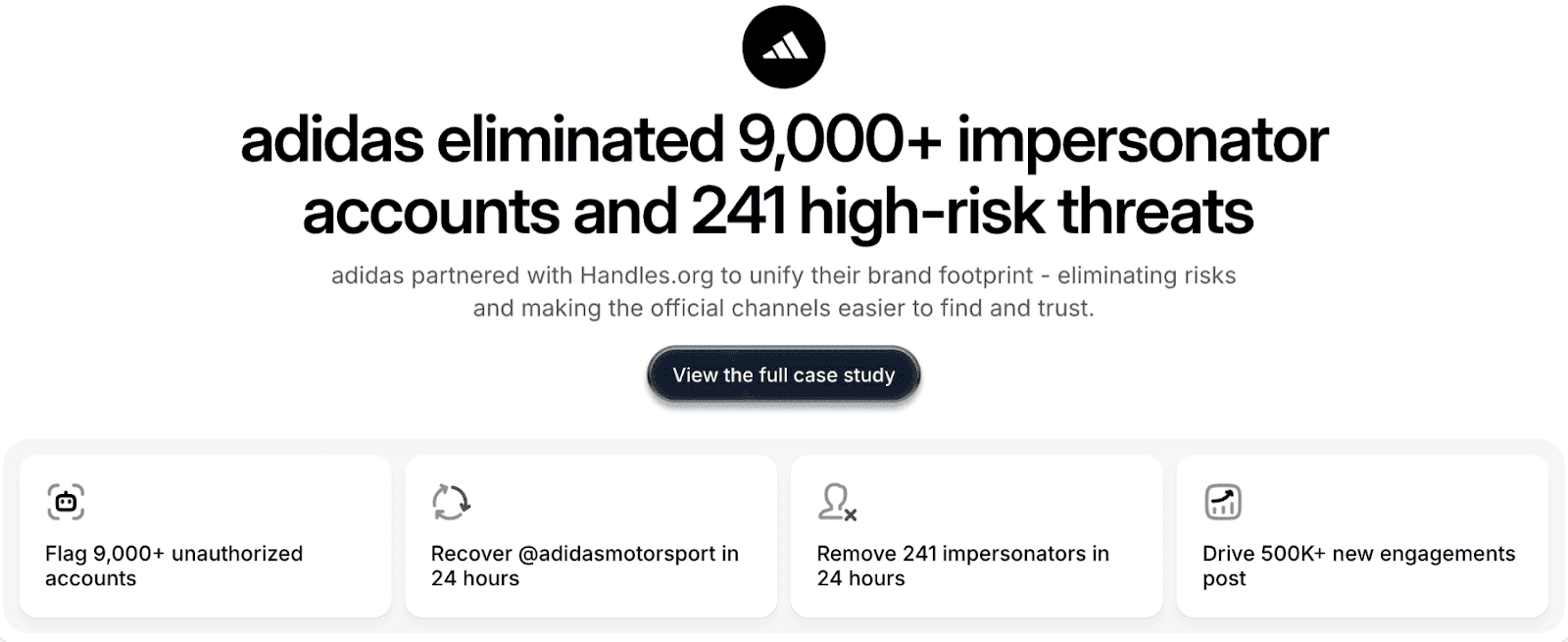
Our AI-powered tools instantly scan every platform, including Instagram, to find hidden vulnerabilities, over-permissioned accounts, and missing security settings. It gives you the confidence that your accounts are secure, always.
What Is Instagram Business Account Access?
Instagram Business account access determines who can control your page and what actions they can take. This includes everything from posting and replying to messages to viewing analytics or changing settings.
Think of it like giving out keys to a store:
Admins have master keys to everything.
Editors can open the shop and work.
Moderators can greet customers.
Analysts can only look through the windows.
Every business must manage these “keys” wisely. Once someone leaves your team or finishes a contract, you need to collect those keys immediately.
The Different Instagram Access Roles
When your Instagram is connected through Meta Business Suite, several roles determine what each person can do:
Admin: Full control. They can edit profiles, connect assets, manage others, or delete the account. Limit this to 2–3 people maximum.
Editor: Can post, respond to messages, and view insights. Perfect for social media managers.
Moderator: Can respond to comments and direct messages, but not create posts. Best for customer service roles.
Analyst: View-only. They can see data and performance, but not interact with content.
To keep your Instagram business account secure, use the principle of least privilege—give each person only the access they actually need to do their job, nothing more.
Why Access Management Matters
It’s easy to overlook security on Instagram, but one wrong permission can lead to serious consequences. Especially with Instagram having a whopping 1.74 billion users, unscrupulous agents can do real damage to your brand.
Here’s why managing access properly matters:
Prevent unauthorized posts. Limit admin access so no old account or agency can post without your knowledge.
Protect customer data. Private messages and interactions can expose sensitive information.
Avoid account hijacking. Hacked credentials can lock you out or wipe your account.
Maintain brand consistency. Too many people posting leads to inconsistent or off-brand content.
Enable accountability. Proper tracking helps you identify who made changes and when.
These risks aren’t theoretical. They happen daily. Smart teams secure Instagram access before an incident, not after.
Common Access Management Mistakes
Most account issues come from the same few mistakes. Recognizing them early prevents headaches later.
1. Forgetting to Remove Former Employees
When someone leaves, their access should end that day. Unfortunately, it often gets missed during offboarding. Even ex-employees with good intentions become risks if they still have control over your brand assets.
2. Giving Everyone Admin Rights
Many companies give full admin access to anyone managing posts. That’s dangerous. Admins can remove others or even delete the account. Grant admin rights only to key leaders and IT security staff.
3. Sharing Passwords Instead of Using Business Suite
Sharing a single login for multiple users is a huge mistake. It hides who does what and makes offboarding impossible.
Instead, manage access through Meta Business Suite (Business Manager). This way, each person gets their own permission level, and you never have to share passwords.
4. Not Tracking Who Has Access
If you can’t list everyone with access, you’ve already lost control. Maintain a live list or use a tool like Handles Audit to automatically track all permissions and roles.
5. Skipping Two-Factor Authentication (2FA)
According to Microsoft, 2FA stops over 99% of common account hacks. Make it mandatory for every user who can access your Instagram. Without it, a stolen password can cost you the whole account.
How to Manage Access to Your Instagram Business Account
Instagram access management happens in 3 simple phases:
Audit who currently has access
Grant access safely
Remove or downgrade access when needed
Let’s walk through each phase and see what it entails.
Phase 1: Audit Current Instagram Access
You can’t secure what you can’t see. That’s why the first step is to audit current access.
If your Instagram is linked to Meta Business Suite (recommended for all businesses):
Go to business.facebook.com.
Open Business Settings >> Instagram Accounts.
Select your account and click People to see everyone who has access and their role.
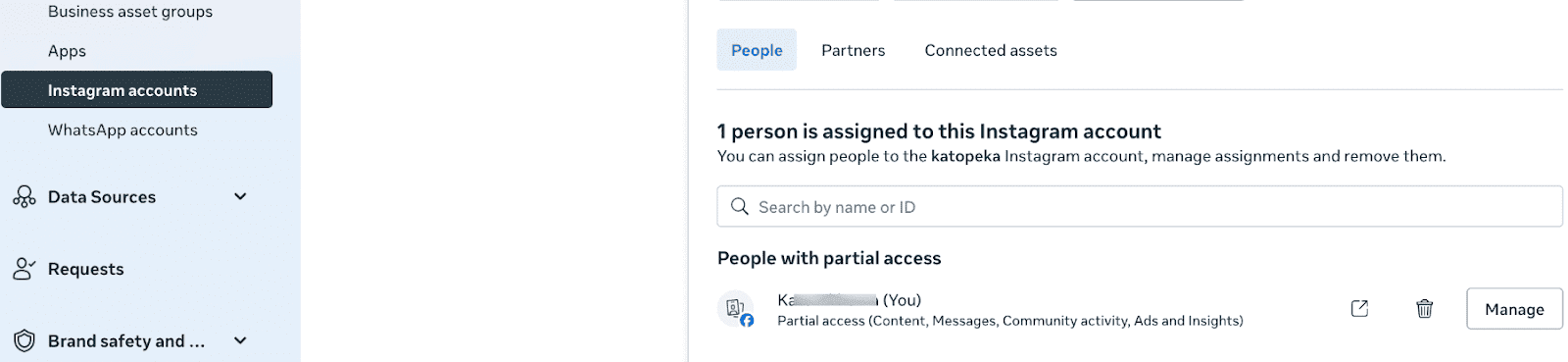
Look for:
People who no longer work with you.
Too many admins.
Accounts missing two-factor authentication.
If you don’t use Business Suite yet, check directly in the Instagram app under Settings >> Account >> Sharing and Permissions, though this method is more limited.
Immediately mark any questionable or outdated access for removal.
Phase 2: Grant Access Safely
When adding new users to your brand’s Instagram account (employees, contractors, or agencies), follow these best practices:
In Business Suite
Go to Business Settings >> Instagram Accounts >> Add People.
Select the person (they’ll need a Facebook account).
Choose the correct role (Admin, Editor, Moderator, Analyst).
Confirm and send the invitation.
Match Roles to Responsibility
Social media managers: Editor
Customer service reps: Moderator
Marketing analysts: Analyst
Agency leads or senior staff: Admin only if necessary
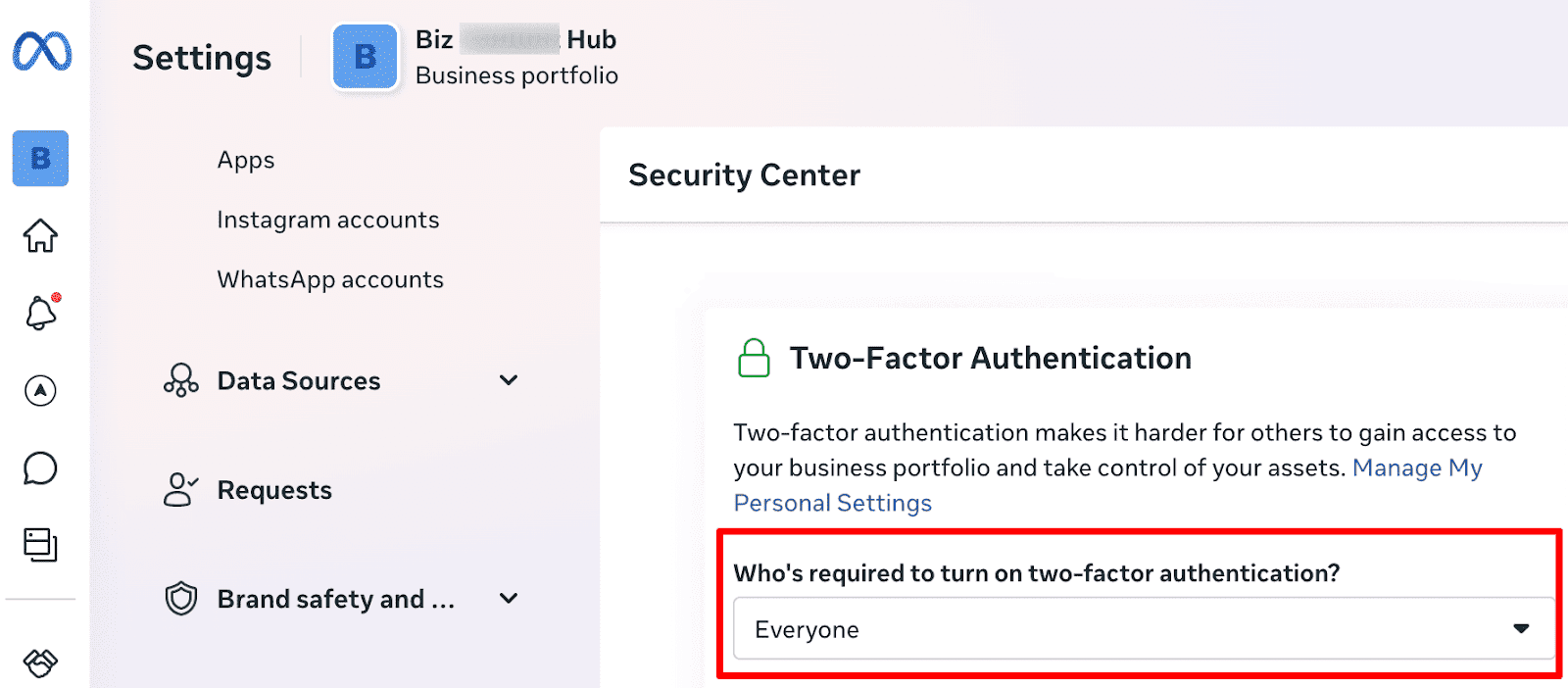
Require Two-factor Authentication (2FA)
In Business Settings, go to Security >> Two-factor Authentication and set it to “required for everyone.”
Use Partner Access for Agencies
Add agencies as Partners, not individuals. Assign them assets but retain overall control. If the contract ends, one click removes their entire access.
Document Everything
Track who requested access, when it was approved, and for how long. This creates accountability and makes audits easier later.
Phase 3: Remove or Downgrade Access
Access cleanup is where most teams fail. It should happen immediately when someone no longer needs it. Outdated permissions open the door to mistakes or misconduct. Here’s how to handle this:
Remove access immediately when someone leaves. Do it the same day. Delaying access removal is the number one cause of account hijacks.
End agency access after contract termination. When an agency relationship ends, remove their partner access and any users they added. Never assume they’ll do it for you.
Downgrade over-permissioned users. If you find Editors with Admin access or old contractors with elevated permissions, reduce their roles right away.
Clean up duplicates and personal accounts. Only verified work accounts should remain. Remove old test or personal accounts that still have permissions.
Schedule a quarterly review to repeat this process because access drift happens quietly. Staying proactive keeps your brand safe.
How Handles Audit Automates Instagram Access Management
Manual spreadsheets and quarterly reviews work for small teams. But if you manage multiple brands, regions, or agencies, manual tracking becomes impossible.
Handles automates the entire process.
Automatic Access Discovery
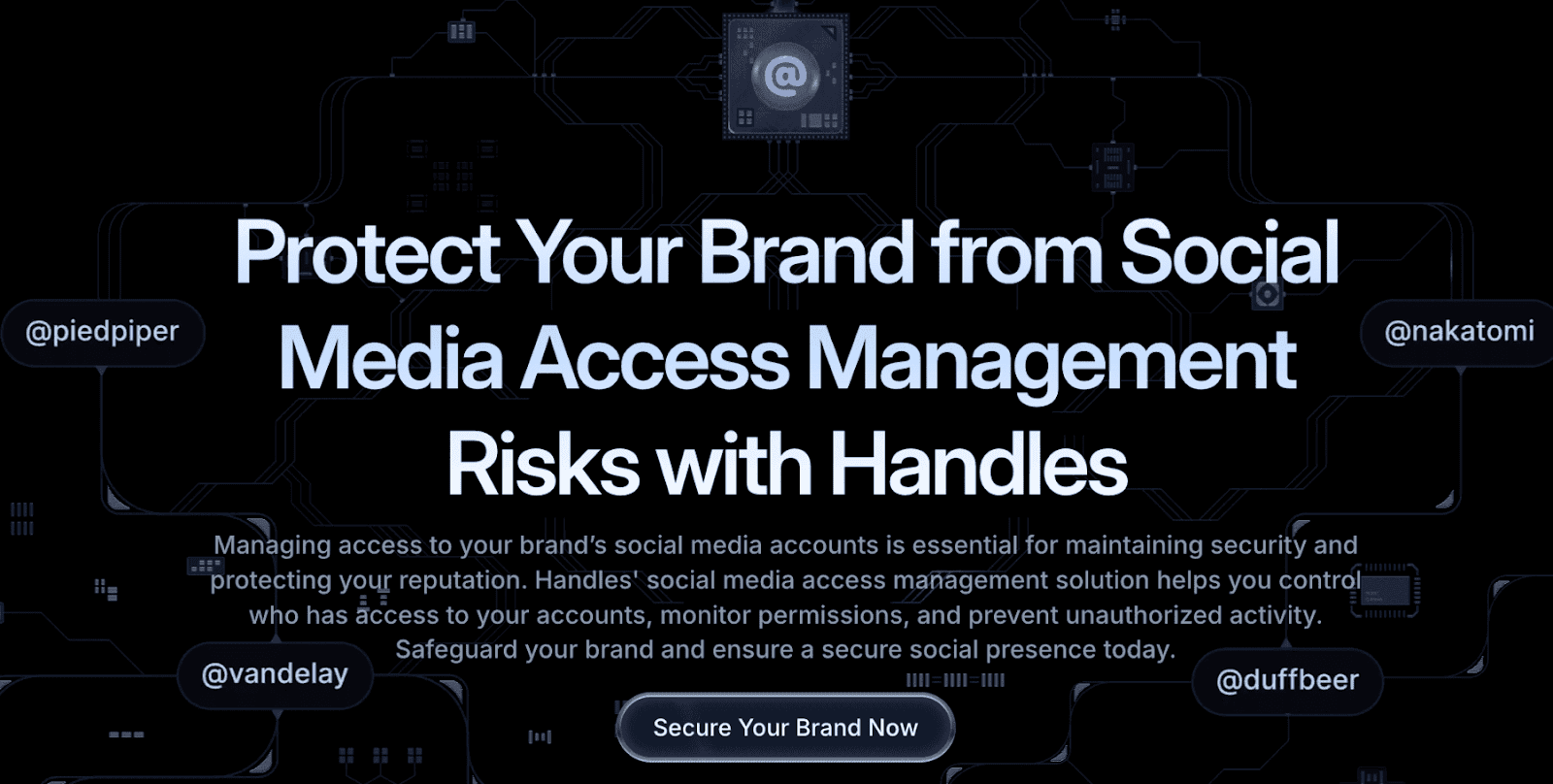
Handles scans your entire Instagram and other linked platforms through official APIs. It finds every user, partner, and connected asset, giving you a complete permissions map in minutes.
AI-Powered Risk Scanning
Handles doesn’t just list who has access. It uses AI to analyze risk factors like:
Ex-employees who still have admin rights
Missing two-factor authentication
Over-permissioned users
Partner organizations with too much control
Orphaned assets without owners
Compliance or privacy gaps
Each issue is rated by severity, so you know what to fix first.
Unified Cross-Platform View
Handles doesn’t stop at Instagram. It also maps your other social media accounts (Facebook, TikTok, LinkedIn, YouTube, and X) in one dashboard. This makes it easy to spot inconsistencies and enforce governance across your entire social presence.
Continuous Monitoring
Access changes constantly as people join, leave, change roles, or get promoted. Handles updates continuously, alerting you when:
New admins appear unexpectedly
Agencies add unapproved users
Someone disables 2FA
Accounts or assets go unowned
Instead of discovering issues during a crisis, you identify them proactively before they cause damage.
Complete Social Media Protection
Beyond access management, Handles offers comprehensive social media security solutions:
Radar: Map your complete social footprint and identify impersonators using your brand across all platforms
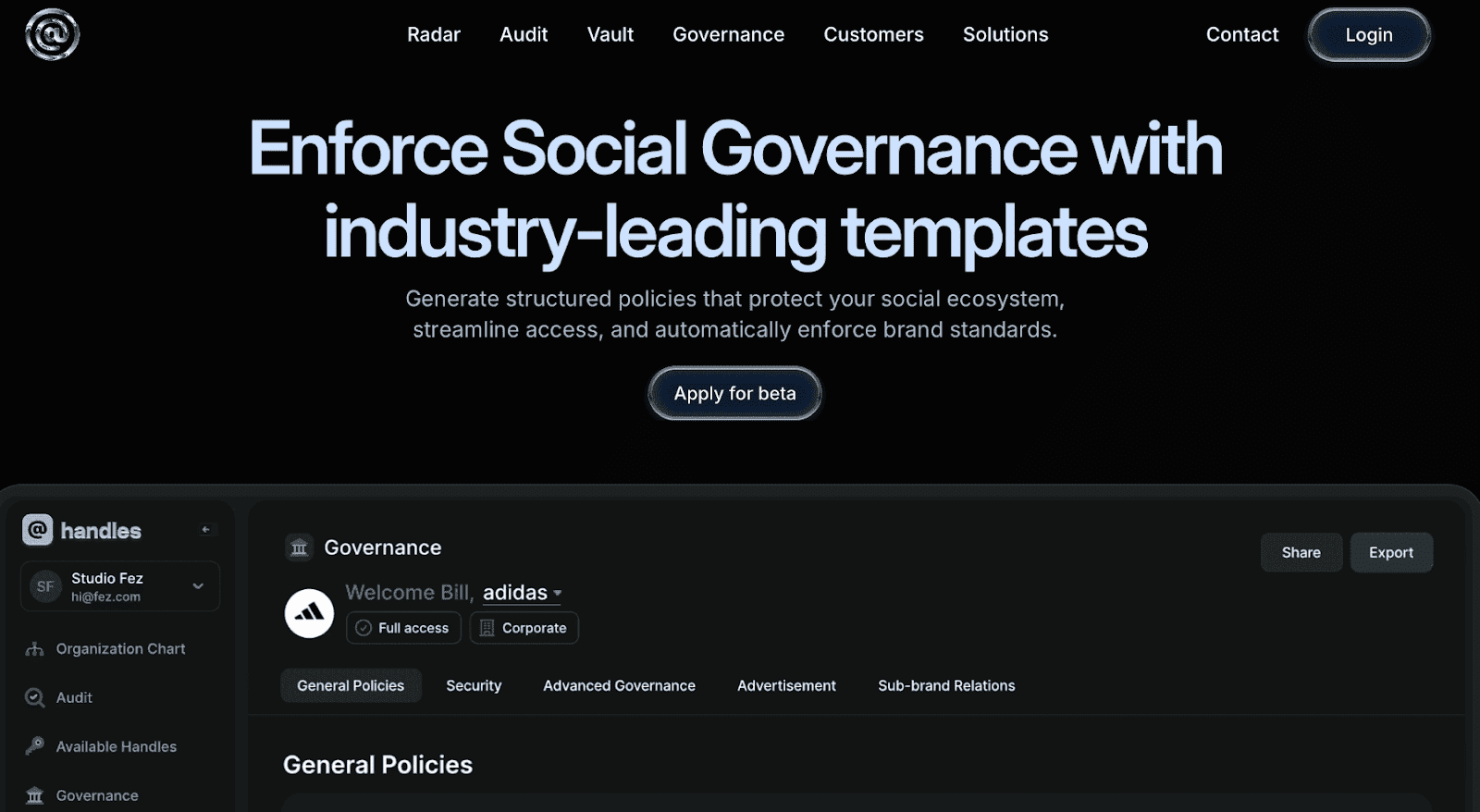
Governance: Centralize approval workflows, automate permission reviews, and maintain compliance as you scale
Impersonation Protection: Detect and eliminate fake accounts scamming your customers
Crisis Management: Respond quickly to security incidents with built-in response protocols
Best Practices for Ongoing Instagram Business Account Access Control
Setting up access management correctly is just the beginning. Here are ongoing practices that keep your Instagram business account secure over time:
Use Business Manager for Agencies and Contractors
When working with external partners, add them through Business Manager rather than sharing passwords. This gives you better control and makes it easy to remove their access when contracts end.
Review Access Quarterly
Set a recurring calendar reminder to review everyone's access every 3 months. Remove inactive users and adjust roles as needed.
Create an Incident Response Plan
Know what to do if your account gets compromised. Who will change passwords? How will you communicate with customers? Having a plan before you need it makes recovery much faster.
Train Your Team
Make sure everyone who has access understands their responsibilities, knows not to share login credentials, and recognizes phishing attempts that could compromise the account.
Secure Your Instagram Business Access Today
Your Instagram account isn’t just social media. It’s a valuable business asset that represents your brand, attracts customers, and generates revenue. Uncontrolled access can lead to financial losses, legal risks, and brand damage.
By auditing access, enabling 2FA, and regularly reviewing permissions, you’ll drastically reduce your vulnerability.
And if you want full visibility across Instagram and every social channel, Handles gives you that in minutes. No spreadsheets, no guesswork. Just complete clarity and control.
Contact our team to secure your social media infrastructure today.
FAQs: Managing Instagram Business Access
How many admins should I have?
No more than 2–3 (even though Meta allows more). Typically, a trusted owner, senior marketing lead, and maybe an IT manager. Too many admins create confusion and risk.
Can I manage Instagram access without Business Manager?
You can, but you shouldn’t. Meta Business Suite offers far more control, tracking, and security than managing access directly on Instagram.
What is the best tool to manage Instagram access?
For enterprises managing complex social footprints across multiple platforms, Handles is the best tool to manage Instagram access at scale. It’s an AI-powered tool that connects directly with platform APIs to automatically discover all users, permissions, and vulnerabilities across Instagram and other social platforms. It also identifies and rates potential risks.
What if a former employee still has access?
Remove them immediately through Business Suite. If you shared passwords, change them and enable 2FA. Then review all recent activities and posts for any suspicious behavior.
How often should I audit Instagram access?
Do a full review quarterly and whenever someone leaves the company, changes roles, or agency contracts end.

Quick Summary
Managing access to your Instagram Business account is critical to protect your brand from security risks, data loss, and unauthorized content. In this guide, you’ll learn how to audit user permissions, assign secure roles, remove old access, and prevent takeovers. You’ll also learn how AI-powered tools like Handles can automate your social media security.
Feel Like Too Many People Control Your Instagram?
If your Instagram feels like it has too many cooks in the kitchen, you’re not alone. Many business owners discover old employees, agencies, or freelancers still have access to their accounts months after projects end.
This creates major risks:
Former staff members can still post (or worse).
Agencies have lingering admin rights.
No one’s sure who can change what.
Access chaos often hits hard after something goes wrong—a hacked account, a rogue post, or a missing password. The truth is, managing access isn’t complicated once you understand the system. Let’s fix it.
Why Listen to Us?
At handles.org, we've helped major brands like Adidas, Framer, and Cohere secure their social media infrastructure. We've audited thousands of accounts, eliminated over 9,000 impersonators for a single client, and built governance systems that prevent security incidents before they happen.
Our Audit tool gives enterprise brands the visibility they need across every social platform, automatically flagging the high-risk vulnerabilities that manual audits miss. And our Radar maps your entire social footprint to surface official accounts and partners. Most importantly, it also reveals impersonators and security risks.

Our AI-powered tools instantly scan every platform, including Instagram, to find hidden vulnerabilities, over-permissioned accounts, and missing security settings. It gives you the confidence that your accounts are secure, always.
What Is Instagram Business Account Access?
Instagram Business account access determines who can control your page and what actions they can take. This includes everything from posting and replying to messages to viewing analytics or changing settings.
Think of it like giving out keys to a store:
Admins have master keys to everything.
Editors can open the shop and work.
Moderators can greet customers.
Analysts can only look through the windows.
Every business must manage these “keys” wisely. Once someone leaves your team or finishes a contract, you need to collect those keys immediately.
The Different Instagram Access Roles
When your Instagram is connected through Meta Business Suite, several roles determine what each person can do:
Admin: Full control. They can edit profiles, connect assets, manage others, or delete the account. Limit this to 2–3 people maximum.
Editor: Can post, respond to messages, and view insights. Perfect for social media managers.
Moderator: Can respond to comments and direct messages, but not create posts. Best for customer service roles.
Analyst: View-only. They can see data and performance, but not interact with content.
To keep your Instagram business account secure, use the principle of least privilege—give each person only the access they actually need to do their job, nothing more.
Why Access Management Matters
It’s easy to overlook security on Instagram, but one wrong permission can lead to serious consequences. Especially with Instagram having a whopping 1.74 billion users, unscrupulous agents can do real damage to your brand.
Here’s why managing access properly matters:
Prevent unauthorized posts. Limit admin access so no old account or agency can post without your knowledge.
Protect customer data. Private messages and interactions can expose sensitive information.
Avoid account hijacking. Hacked credentials can lock you out or wipe your account.
Maintain brand consistency. Too many people posting leads to inconsistent or off-brand content.
Enable accountability. Proper tracking helps you identify who made changes and when.
These risks aren’t theoretical. They happen daily. Smart teams secure Instagram access before an incident, not after.
Common Access Management Mistakes
Most account issues come from the same few mistakes. Recognizing them early prevents headaches later.
1. Forgetting to Remove Former Employees
When someone leaves, their access should end that day. Unfortunately, it often gets missed during offboarding. Even ex-employees with good intentions become risks if they still have control over your brand assets.
2. Giving Everyone Admin Rights
Many companies give full admin access to anyone managing posts. That’s dangerous. Admins can remove others or even delete the account. Grant admin rights only to key leaders and IT security staff.
3. Sharing Passwords Instead of Using Business Suite
Sharing a single login for multiple users is a huge mistake. It hides who does what and makes offboarding impossible.
Instead, manage access through Meta Business Suite (Business Manager). This way, each person gets their own permission level, and you never have to share passwords.
4. Not Tracking Who Has Access
If you can’t list everyone with access, you’ve already lost control. Maintain a live list or use a tool like Handles Audit to automatically track all permissions and roles.
5. Skipping Two-Factor Authentication (2FA)
According to Microsoft, 2FA stops over 99% of common account hacks. Make it mandatory for every user who can access your Instagram. Without it, a stolen password can cost you the whole account.
How to Manage Access to Your Instagram Business Account
Instagram access management happens in 3 simple phases:
Audit who currently has access
Grant access safely
Remove or downgrade access when needed
Let’s walk through each phase and see what it entails.
Phase 1: Audit Current Instagram Access
You can’t secure what you can’t see. That’s why the first step is to audit current access.
If your Instagram is linked to Meta Business Suite (recommended for all businesses):
Go to business.facebook.com.
Open Business Settings >> Instagram Accounts.
Select your account and click People to see everyone who has access and their role.

Look for:
People who no longer work with you.
Too many admins.
Accounts missing two-factor authentication.
If you don’t use Business Suite yet, check directly in the Instagram app under Settings >> Account >> Sharing and Permissions, though this method is more limited.
Immediately mark any questionable or outdated access for removal.
Phase 2: Grant Access Safely
When adding new users to your brand’s Instagram account (employees, contractors, or agencies), follow these best practices:
In Business Suite
Go to Business Settings >> Instagram Accounts >> Add People.
Select the person (they’ll need a Facebook account).
Choose the correct role (Admin, Editor, Moderator, Analyst).
Confirm and send the invitation.
Match Roles to Responsibility
Social media managers: Editor
Customer service reps: Moderator
Marketing analysts: Analyst
Agency leads or senior staff: Admin only if necessary
Require Two-factor Authentication (2FA)
In Business Settings, go to Security >> Two-factor Authentication and set it to “required for everyone.”

Use Partner Access for Agencies
Add agencies as Partners, not individuals. Assign them assets but retain overall control. If the contract ends, one click removes their entire access.
Document Everything
Track who requested access, when it was approved, and for how long. This creates accountability and makes audits easier later.
Phase 3: Remove or Downgrade Access
Access cleanup is where most teams fail. It should happen immediately when someone no longer needs it. Outdated permissions open the door to mistakes or misconduct. Here’s how to handle this:
Remove access immediately when someone leaves. Do it the same day. Delaying access removal is the number one cause of account hijacks.
End agency access after contract termination. When an agency relationship ends, remove their partner access and any users they added. Never assume they’ll do it for you.
Downgrade over-permissioned users. If you find Editors with Admin access or old contractors with elevated permissions, reduce their roles right away.
Clean up duplicates and personal accounts. Only verified work accounts should remain. Remove old test or personal accounts that still have permissions.
Schedule a quarterly review to repeat this process because access drift happens quietly. Staying proactive keeps your brand safe.
How Handles Audit Automates Instagram Access Management
Manual spreadsheets and quarterly reviews work for small teams. But if you manage multiple brands, regions, or agencies, manual tracking becomes impossible.
Handles automates the entire process.
Automatic Access Discovery
Handles scans your entire Instagram and other linked platforms through official APIs. It finds every user, partner, and connected asset, giving you a complete permissions map in minutes.

AI-Powered Risk Scanning
Handles doesn’t just list who has access. It uses AI to analyze risk factors like:
Ex-employees who still have admin rights
Missing two-factor authentication
Over-permissioned users
Partner organizations with too much control
Orphaned assets without owners
Compliance or privacy gaps
Each issue is rated by severity, so you know what to fix first.
Unified Cross-Platform View
Handles doesn’t stop at Instagram. It also maps your other social media accounts (Facebook, TikTok, LinkedIn, YouTube, and X) in one dashboard. This makes it easy to spot inconsistencies and enforce governance across your entire social presence.

Continuous Monitoring
Access changes constantly as people join, leave, change roles, or get promoted. Handles updates continuously, alerting you when:
New admins appear unexpectedly
Agencies add unapproved users
Someone disables 2FA
Accounts or assets go unowned
Instead of discovering issues during a crisis, you identify them proactively before they cause damage.
Complete Social Media Protection
Beyond access management, Handles offers comprehensive social media security solutions:
Radar: Map your complete social footprint and identify impersonators using your brand across all platforms
Governance: Centralize approval workflows, automate permission reviews, and maintain compliance as you scale
Impersonation Protection: Detect and eliminate fake accounts scamming your customers
Crisis Management: Respond quickly to security incidents with built-in response protocols
Best Practices for Ongoing Instagram Business Account Access Control
Setting up access management correctly is just the beginning. Here are ongoing practices that keep your Instagram business account secure over time:
Use Business Manager for Agencies and Contractors
When working with external partners, add them through Business Manager rather than sharing passwords. This gives you better control and makes it easy to remove their access when contracts end.
Review Access Quarterly
Set a recurring calendar reminder to review everyone's access every 3 months. Remove inactive users and adjust roles as needed.
Create an Incident Response Plan
Know what to do if your account gets compromised. Who will change passwords? How will you communicate with customers? Having a plan before you need it makes recovery much faster.
Train Your Team
Make sure everyone who has access understands their responsibilities, knows not to share login credentials, and recognizes phishing attempts that could compromise the account.
Secure Your Instagram Business Access Today
Your Instagram account isn’t just social media. It’s a valuable business asset that represents your brand, attracts customers, and generates revenue. Uncontrolled access can lead to financial losses, legal risks, and brand damage.
By auditing access, enabling 2FA, and regularly reviewing permissions, you’ll drastically reduce your vulnerability.
And if you want full visibility across Instagram and every social channel, Handles gives you that in minutes. No spreadsheets, no guesswork. Just complete clarity and control.
Contact our team to secure your social media infrastructure today.
FAQs: Managing Instagram Business Access
How many admins should I have?
No more than 2–3 (even though Meta allows more). Typically, a trusted owner, senior marketing lead, and maybe an IT manager. Too many admins create confusion and risk.
Can I manage Instagram access without Business Manager?
You can, but you shouldn’t. Meta Business Suite offers far more control, tracking, and security than managing access directly on Instagram.
What is the best tool to manage Instagram access?
For enterprises managing complex social footprints across multiple platforms, Handles is the best tool to manage Instagram access at scale. It’s an AI-powered tool that connects directly with platform APIs to automatically discover all users, permissions, and vulnerabilities across Instagram and other social platforms. It also identifies and rates potential risks.
What if a former employee still has access?
Remove them immediately through Business Suite. If you shared passwords, change them and enable 2FA. Then review all recent activities and posts for any suspicious behavior.
How often should I audit Instagram access?
Do a full review quarterly and whenever someone leaves the company, changes roles, or agency contracts end.
Social media governance
& Infrastructure.
Social media governance
& Infrastructure.

© 2026 Handles.ai. All Rights Reserved.