
7 User Access Management Best Practices for Social Media

7 User Access Management Best Practices for Social Media

Handles Newsroom Team

Written by

Quick Summary

User access management determines who can touch your social media accounts and what they can do when they get there. Get it wrong and you're exposed to unauthorized posts, compliance violations, and security breaches. These seven practices help enterprise brands maintain control as teams grow, agencies rotate, and platforms add complexity.

Why Access Management Breaks Down

Nobody sets out to create permission chaos. It accumulates.

A contractor gets admin access because it's faster than figuring out the right tier. A former employee's personal email stays attached to your TikTok Business Center because offboarding didn't include social accounts. An old agency still has advertiser access to your Meta Business Manager six months after the engagement ended.

Multiply this across every platform, every account, every employee and contractor and agency relationship over the past three years. That's how brands end up with access lists that bear no resemblance to their actual org charts.

The practices below won't eliminate the work of access management, but they'll prevent the slow drift toward chaos that makes enterprise social media a security liability.

7 Best Practices for Social Media User Access Management

1. Monitor Continuously, Not Quarterly

Teams audit quarterly. Permissions change daily. That gap is where access management falls apart.

In the three months between reviews, new hires get added to platforms. Contractors finish projects but keep access. Someone grants temporary elevated permissions that never get revoked. Agency relationships end without triggering access removal. By the time your scheduled audit happens, the spreadsheet you're working from reflects a reality that no longer exists.

Handles exists because we watched this pattern repeat across enterprise after enterprise. 
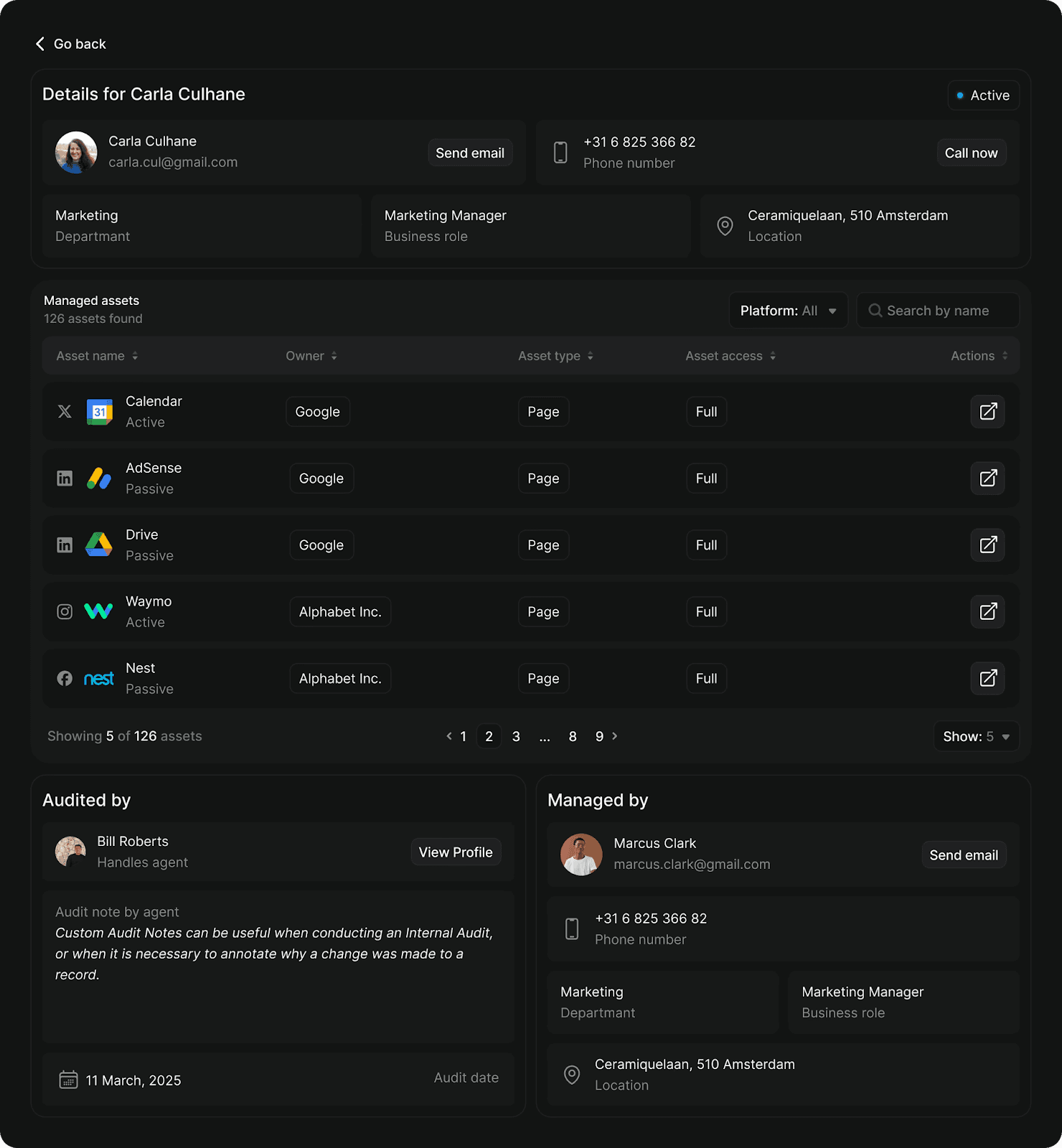

Our platform ingests your org chart and HR data, monitors permissions across Meta, LinkedIn, TikTok, YouTube, and other platforms continuously, and flags anomalies the moment they appear:

  • Audit: Surfaces orphaned access, overpermissioned users, missing 2FA, and role mismatches across all connected platforms

  • Governance: Provides templates, automated workflows, and compliance reporting to enforce access policies at scale

  • Radar: Maps your complete social footprint and detects impersonators that manual searches miss

Instead of quarterly audits that take weeks and miss things, you get continuous visibility that catches problems before they become breaches.

2. Default to Least Privilege

The principle is simple. Grant the minimum access required to do the job (nothing more).

In practice, this means your content coordinator gets posting access rather than admin rights. Your agency gets advertiser access to specific accounts. Your CMO gets reporting access rather than campaign controls, because executives need visibility… not the ability to accidentally pause your highest-performing ad set.

The challenge is that least privilege requires knowing what each permission tier actually allows, and platforms don't make this easy. Meta Business Manager has five distinct roles. LinkedIn has three. TikTok has four. The terminology differs across platforms, and "Admin" on TikTok grants different capabilities than "Admin" on YouTube.

Build a reference matrix before you need it. Document what each role can and cannot do on each platform, then map your internal job functions to appropriate permission levels. When someone requests access, the decision is already made.

Here's an example of how that mapping might look:

Role

Meta

LinkedIn

TikTok

YouTube

Executive

Analyst

Analyst

Analyst

Viewer

Marketing Manager

Employee

Content Admin

Operator

Editor

Content Coordinator

Employee

Content Admin

Operator

Editor

Agency (active)

Advertiser

Content Admin

Advertiser

Editor

Finance

Finance Editor

-

-

-

3. Eliminate Single Points of Failure

If one person holds the only admin access to a critical account, you don't have access management. You have a hostage situation waiting to happen.

The scenario is more common than it should be. Recovery requires weeks of platform support escalation, sometimes legal involvement, and occasionally ends with permanent loss of access to accounts you built over years.

Every critical account needs at least two people with admin-level access, ideally three. These shouldn't all report to the same manager or sit in the same department. 

4. Revoke Access on Departure Day

The window between an employee's last day and when their access gets revoked is exposure. A disgruntled former employee with lingering admin access can: 

  • Delete content

  • Change passwords

  • Lock out current team members

  • Post damaging content

Same-day revocation should be policy. This requires coordination between HR and whoever owns social media access, which means the process needs to be documented before you need it. 

For contractors and agencies, build end dates into the access grant itself. Project-based access should expire automatically when the project ends, not linger until someone remembers to audit it.

5. Treat Agency Access as a Separate Category

Agencies aren't employees, but they often end up with employee-level access because it's easier than configuring appropriate restrictions.

This creates problems. 

Best practice is to grant agencies the minimum tier required (usually advertiser or content access, rarely admin), restrict access to specific accounts rather than Business Manager level, set calendar reminders to review agency access quarterly, and revoke access immediately when engagements end rather than waiting for the next audit cycle.

Some platforms make this easier than others. Meta's partner access tiers exist specifically for agency relationships. Use them instead of granting employee-equivalent access.

6. Require 2FA for Elevated Access

Two-factor authentication is table stakes for any account with admin, billing, or posting privileges. This isn't optional, and SMS-based 2FA isn't sufficient since SIM swapping attacks can intercept text-based codes.

Require authenticator apps (Google Authenticator, Authy, or similar) for all elevated access. Store backup codes in a secure, accessible location so a lost phone doesn't create a week-long lockout.

Some platforms are moving toward mandatory 2FA for admin roles. Meta requires it in certain regions. X made it essential after high-profile breaches. Rather than waiting for platforms to force the issue, make it policy now.

7. Audit Third-Party Connections Separately

Every scheduling tool, analytics platform, and chatbot you've connected to your social accounts represents another potential entry point. These connections accumulate over time as teams try new tools, run experiments, and forget to clean up afterward.

A compromised third-party tool can cascade across every account it touches. One breached scheduling platform gave attackers access to hundreds of brand accounts simultaneously. The brands had done everything right with their direct access management, but a vulnerability in a connected app bypassed all of it.

Review connected applications quarterly. You'll find them in platform-specific locations:

  • Meta: Settings → Business Integrations

  • Instagram: Settings → Security → Apps

  • LinkedIn: Settings → Permitted Services

  • X: Settings → Apps and Sessions

  • TikTok: Settings → Apps

Revoke anything dormant, unfamiliar, or no longer needed. When evaluating new tools, assess their security practices before granting access, and prefer tools that request minimal permissions.

Tighten Your Access Governance Today

Permission chaos doesn't announce itself. It accumulates quietly until something breaks: a former employee posts something damaging, an auditor flags compliance gaps, or a compromised credential cascades across your entire social presence.

These practices won't eliminate the work of access management, but they'll keep the chaos from compounding. Start with a single platform and audit who has access today versus who should. Or explore how Handles automates the monitoring that spreadsheets can't maintain.

Get early access toHandles by applying for abeta audit here.

Quick Summary

User access management determines who can touch your social media accounts and what they can do when they get there. Get it wrong and you're exposed to unauthorized posts, compliance violations, and security breaches. These seven practices help enterprise brands maintain control as teams grow, agencies rotate, and platforms add complexity.

Why Access Management Breaks Down

Nobody sets out to create permission chaos. It accumulates.

A contractor gets admin access because it's faster than figuring out the right tier. A former employee's personal email stays attached to your TikTok Business Center because offboarding didn't include social accounts. An old agency still has advertiser access to your Meta Business Manager six months after the engagement ended.

Multiply this across every platform, every account, every employee and contractor and agency relationship over the past three years. That's how brands end up with access lists that bear no resemblance to their actual org charts.

The practices below won't eliminate the work of access management, but they'll prevent the slow drift toward chaos that makes enterprise social media a security liability.

7 Best Practices for Social Media User Access Management

1. Monitor Continuously, Not Quarterly

Teams audit quarterly. Permissions change daily. That gap is where access management falls apart.

In the three months between reviews, new hires get added to platforms. Contractors finish projects but keep access. Someone grants temporary elevated permissions that never get revoked. Agency relationships end without triggering access removal. By the time your scheduled audit happens, the spreadsheet you're working from reflects a reality that no longer exists.

Handles exists because we watched this pattern repeat across enterprise after enterprise. 


Our platform ingests your org chart and HR data, monitors permissions across Meta, LinkedIn, TikTok, YouTube, and other platforms continuously, and flags anomalies the moment they appear:

  • Audit: Surfaces orphaned access, overpermissioned users, missing 2FA, and role mismatches across all connected platforms

  • Governance: Provides templates, automated workflows, and compliance reporting to enforce access policies at scale

  • Radar: Maps your complete social footprint and detects impersonators that manual searches miss

Instead of quarterly audits that take weeks and miss things, you get continuous visibility that catches problems before they become breaches.

2. Default to Least Privilege

The principle is simple. Grant the minimum access required to do the job (nothing more).

In practice, this means your content coordinator gets posting access rather than admin rights. Your agency gets advertiser access to specific accounts. Your CMO gets reporting access rather than campaign controls, because executives need visibility… not the ability to accidentally pause your highest-performing ad set.

The challenge is that least privilege requires knowing what each permission tier actually allows, and platforms don't make this easy. Meta Business Manager has five distinct roles. LinkedIn has three. TikTok has four. The terminology differs across platforms, and "Admin" on TikTok grants different capabilities than "Admin" on YouTube.

Build a reference matrix before you need it. Document what each role can and cannot do on each platform, then map your internal job functions to appropriate permission levels. When someone requests access, the decision is already made.

Here's an example of how that mapping might look:

Role

Meta

LinkedIn

TikTok

YouTube

Executive

Analyst

Analyst

Analyst

Viewer

Marketing Manager

Employee

Content Admin

Operator

Editor

Content Coordinator

Employee

Content Admin

Operator

Editor

Agency (active)

Advertiser

Content Admin

Advertiser

Editor

Finance

Finance Editor

-

-

-

3. Eliminate Single Points of Failure

If one person holds the only admin access to a critical account, you don't have access management. You have a hostage situation waiting to happen.

The scenario is more common than it should be. Recovery requires weeks of platform support escalation, sometimes legal involvement, and occasionally ends with permanent loss of access to accounts you built over years.

Every critical account needs at least two people with admin-level access, ideally three. These shouldn't all report to the same manager or sit in the same department. 

4. Revoke Access on Departure Day

The window between an employee's last day and when their access gets revoked is exposure. A disgruntled former employee with lingering admin access can: 

  • Delete content

  • Change passwords

  • Lock out current team members

  • Post damaging content

Same-day revocation should be policy. This requires coordination between HR and whoever owns social media access, which means the process needs to be documented before you need it. 

For contractors and agencies, build end dates into the access grant itself. Project-based access should expire automatically when the project ends, not linger until someone remembers to audit it.

5. Treat Agency Access as a Separate Category

Agencies aren't employees, but they often end up with employee-level access because it's easier than configuring appropriate restrictions.

This creates problems. 

Best practice is to grant agencies the minimum tier required (usually advertiser or content access, rarely admin), restrict access to specific accounts rather than Business Manager level, set calendar reminders to review agency access quarterly, and revoke access immediately when engagements end rather than waiting for the next audit cycle.

Some platforms make this easier than others. Meta's partner access tiers exist specifically for agency relationships. Use them instead of granting employee-equivalent access.

6. Require 2FA for Elevated Access

Two-factor authentication is table stakes for any account with admin, billing, or posting privileges. This isn't optional, and SMS-based 2FA isn't sufficient since SIM swapping attacks can intercept text-based codes.

Require authenticator apps (Google Authenticator, Authy, or similar) for all elevated access. Store backup codes in a secure, accessible location so a lost phone doesn't create a week-long lockout.

Some platforms are moving toward mandatory 2FA for admin roles. Meta requires it in certain regions. X made it essential after high-profile breaches. Rather than waiting for platforms to force the issue, make it policy now.

7. Audit Third-Party Connections Separately

Every scheduling tool, analytics platform, and chatbot you've connected to your social accounts represents another potential entry point. These connections accumulate over time as teams try new tools, run experiments, and forget to clean up afterward.

A compromised third-party tool can cascade across every account it touches. One breached scheduling platform gave attackers access to hundreds of brand accounts simultaneously. The brands had done everything right with their direct access management, but a vulnerability in a connected app bypassed all of it.

Review connected applications quarterly. You'll find them in platform-specific locations:

  • Meta: Settings → Business Integrations

  • Instagram: Settings → Security → Apps

  • LinkedIn: Settings → Permitted Services

  • X: Settings → Apps and Sessions

  • TikTok: Settings → Apps

Revoke anything dormant, unfamiliar, or no longer needed. When evaluating new tools, assess their security practices before granting access, and prefer tools that request minimal permissions.

Tighten Your Access Governance Today

Permission chaos doesn't announce itself. It accumulates quietly until something breaks: a former employee posts something damaging, an auditor flags compliance gaps, or a compromised credential cascades across your entire social presence.

These practices won't eliminate the work of access management, but they'll keep the chaos from compounding. Start with a single platform and audit who has access today versus who should. Or explore how Handles automates the monitoring that spreadsheets can't maintain.

Get early access toHandles by applying for abeta audit here.

© 2026 Handles.ai. All Rights Reserved.