
Our Mission
Social media has undergone a major transformation
Partners
We are parters with industry leaders
Customers
Updating brand assets across accounts is a nightmare.
Our Mission
Social media has undergone a major transformation
Partners
We are parters with industry leaders
Customers
Updating brand assets across accounts is a nightmare.
Our Mission
Social media has undergone a major transformation
Partners
We are parters with industry leaders
Customers
Updating brand assets across accounts is a nightmare.
A Complete Social Media Security Audit Checklist for 2026
Learn how to run a social media security audit using our complete checklist. Identify access risks, spot impersonators, and protect your brand across platforms before issues occur.

handles.org Newsroom Team
Written by

Quick Summary
A social media security audit is a tool that helps you identify vulnerabilities across your social accounts before they become security incidents. This guide provides a complete checklist for auditing the most risk-prone areas of your social footprint. These include access permissions, unauthorized accounts, reviewing platform security settings, and more. You'll learn how to spot the risks most companies miss and how to use automation to maintain continuous security as your social presence grows.
Do You Need a Social Media Security Audit?
Most companies don't think about social media security until something breaks.
A hacked account posts offensive content.
A former employee still has admin access six months after leaving.
An impersonator scams your customers.
An agency you fired last year can still publish to your Facebook Page.
Nobody knows who has access to what because permissions live across different platforms and outdated spreadsheets.
By the time you discover these problems, the damage is done. Your brand reputation takes a hit. Customers lose trust. Compliance teams start asking questions you can't answer.
The good news? Most social media security incidents are preventable with proper auditing.
This guide walks you through a complete social media security audit checklist, covering every platform, every permission, and every vulnerability that matters in 2026.
Why Listen to Us?
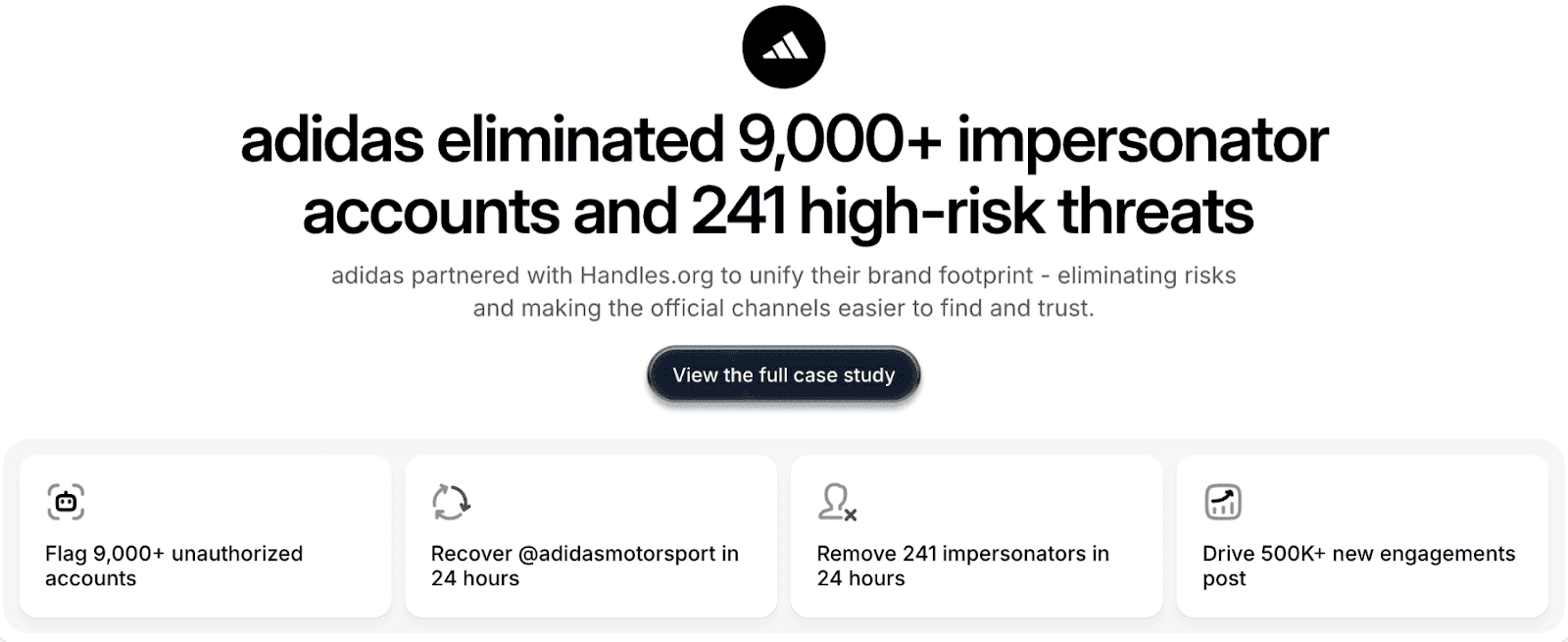
At handles.org, we've helped major brands like Adidas, Framer, and Cohere secure their social media infrastructure. We've audited thousands of accounts, eliminated over 9,000 impersonators for a single client, and built governance systems that prevent security incidents before they happen.
Our Audit tool gives enterprise brands the visibility they need across every social platform, automatically flagging the high-risk vulnerabilities that manual audits miss. And our Radar maps your entire social footprint to surface official accounts and partners. Most importantly, it also reveals impersonators and security risks.
What Is a Social Media Security Audit?
A social media security audit is a systematic review of your organization's social media accounts, access permissions, security settings, and potential vulnerabilities. You should do this across all platforms.
Your audit will help you identify:
Who has access to your accounts and what they can do
Unauthorized or impersonator accounts using your brand
Security gaps in authentication and permissions
Outdated access from former employees or agencies
Platform security settings that need updating
Compliance risks that could trigger regulatory issues
Unlike IT audits that look at servers and networks, a social media security audit focuses on the risks tied to public-facing accounts. These are accounts customers see, may handle sensitive info, and can quickly impact your brand if something goes wrong.
Why Social Media Security Audits Matter
According to IBM, the average cost of a data breach is $4.4M. Social media accounts are among the most exposed and least protected assets in most organizations. Here's why auditing them matters more than ever.
Prevent Brand Damage
One compromised account can publish content that undermines years of brand building. Whether it's a hack, a disgruntled former employee, or an agency mistake, the content goes live instantly and spreads before you can stop it.
Protect Customer Trust
Impersonators and unauthorized accounts scam your customers using your brand name. When people get defrauded by fake accounts, they blame your company even though you didn't create the threat.
Avoid Compliance Violations
Financial services, healthcare, and energy companies face strict regulations about data access and security controls. Social media accounts often hold customer data, targeting information, and communications that fall under compliance requirements. Most teams overlook this aspect.
Stop Financial Fraud
Compromised ad accounts can drain advertising budgets in hours. Unauthorized access to billing information exposes payment methods and spending limits to bad actors who exploit them for financial gain.
Eliminate Single Points of Failure
When one person controls all admin access and leaves the company, you can lose control of critical accounts entirely. This happens more often than companies admit, leading to costly recovery processes and potential legal issues.
Most organizations learn these lessons after an incident. Smart companies audit proactively and prevent problems before they start.
Complete Social Media Security Audit Checklist
Now that you know the importance of a social media security audit, let’s dive into the checklist. We’ve broken it down into different categories to make it easier to use.
Access and Permissions Audit
Your audit should start at the foundation: who has access to what, and do they still need it?
Review All User Accounts
List every person with access to each social media account. Check:
Whether they still work at your company
Whether they still need access for their current role
The permission levels they have
Whether that level matches their job requirements.
Audit Admin and Owner Roles
Identify who has the highest permission levels on each platform. Admin and owner roles should be limited to a small number of trusted individuals, typically senior marketing leaders and IT security staff. Too many admins create security risks.
Check Partner and Agency Access
Review every external organization with access to your accounts. Agencies, contractors, vendors, and partners often retain permissions long after contracts end because no one remembers to revoke them.
Review Role-Based Permissions
For each user, confirm if their specific permissions align with their job responsibilities. A content creator doesn't need billing access. An analyst doesn't need publishing permissions. Over-permissioned accounts create unnecessary risk.
Identify Single Points of Failure
Look for critical accounts where only one person has admin access. This includes ad accounts, Pages, Instagram profiles, and especially billing access. Always have at least two trusted individuals with admin permissions.
Platform Security Settings Audit
Each social platform has security settings that most teams configure once and never review again. Here are some examples:
Two-Factor Authentication
Verify that every account with publishing, advertising, or admin permissions has two-factor authentication enabled. Ensure your organization requires 2FA at the Business Manager (Meta Business Suite for small businesses) or organizational level, not just for individual users, as they can disable it.
Login Alerts
Enable notifications for login attempts from new devices or unusual locations. Doing so can help you catch unauthorized access attempts before they cause damage.
Password Policies
Ensure that passwords follow your organization's security standards. They should be unique to each platform and changed regularly. Also, prohibit password sharing via insecure methods.
Connected Apps and Services
Review all third-party apps and services connected to your social accounts. Includes scheduling tools, analytics platforms, and automation services, as they often have broad permissions that create security vulnerabilities. Remove any connected apps you no longer use.
API Access and Tokens
Check which applications have API access to your accounts and what permissions they hold. Old API tokens from former tools create hidden vulnerabilities that attackers can exploit.
Account and Asset Ownership Audit
Confusion about who owns what causes major problems when people leave or roles change.
Document Asset Owners
For every Page, ad account, Instagram profile, TikTok account, LinkedIn Company Page, and YouTube channel, identify the current owner. This person is responsible for maintaining security, managing access, and responding to issues.
Check Email Addresses
Verify email addresses associated with each of your social accounts. Many organizations discover accounts linked to personal email addresses, former employee email addresses, or generic addresses that go unmonitored.
Review Phone Numbers
Check what phone numbers are registered for account recovery and 2FA. Those tied to former employees or contractors create recovery vulnerabilities.
Audit Billing Access
Review who can view, edit, or control payment methods and billing information. Billing access should be tightly controlled and limited to finance team members and senior marketing leaders.
Brand Protection and Impersonation Audit
Your official accounts are only part of your social footprint. Unauthorized accounts using your brand create significant risks.
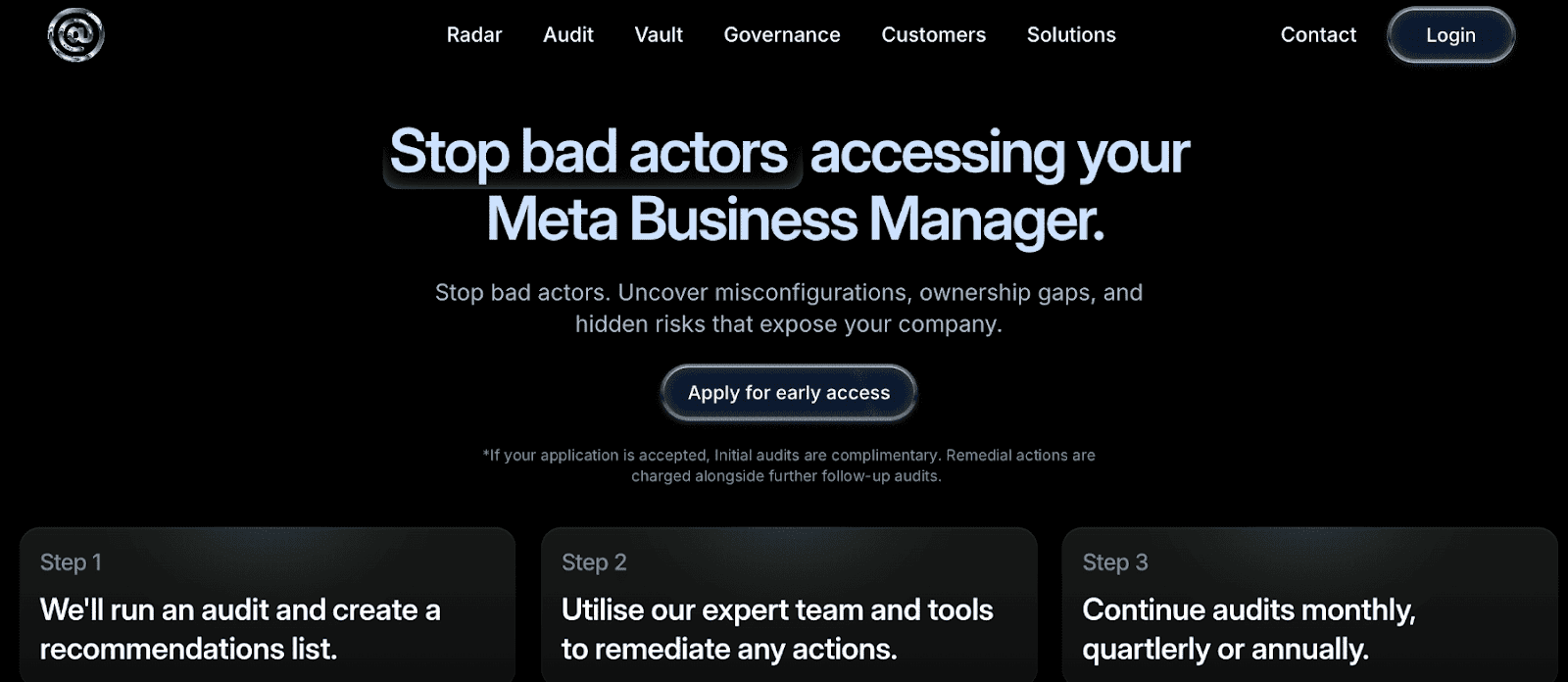
Search for Impersonators
Check each social media platform for accounts impersonating your brand. Look for:
Variations of your brand name
Handles with minor changes
Accounts using your logo
Profiles claiming official status
Map Your Complete Footprint
Identify every account that represents your organization, including:
Regional accounts
Product-specific accounts
Employee advocacy accounts
Legacy accounts from acquisitions or rebrands
Check Verification Status
Verify that your official accounts have verification badges where available. Verified status helps customers distinguish real accounts from fakes and provides some protection against impersonation.
Monitor Brand Mentions
Track how your brand is being mentioned across platforms. Unauthorized accounts often tag your official profiles or use your branded hashtags, making them easier to detect through monitoring.
Compliance and Governance Audit
Security isn't just about preventing hacks. It's also about meeting regulatory requirements and documenting internal policies. This is called governance.
Review Data Handling
Check what customer data your social accounts collect, store, or process. This includes data from ads, messages, comments, and integrated tools like pixels and conversion tracking. Ensure your data handling complies with relevant regulations, such as GDPR, CCPA, and others.
Audit Privacy Settings
Review privacy settings for each account and ensure they align with your privacy policies. Check who can see your posts, who can message your accounts, what data you collect from followers, and how you use that data.
Document Access Approval Process
Verify that you have a documented process for granting, reviewing, and revoking social media access. Without documentation, compliance audits become impossible to pass, and security becomes impossible to maintain.
Check Incident Response Plan
Confirm that your organization has an incident response plan specifically for social media security breaches. Most organizations create these plans after their first major incident. Create yours before you need it.
Content and Publishing Audit
The content you publish and how you publish it create security risks that are easy to overlook.
Review Publishing Permissions
Check who can publish content to each account and whether those permissions are appropriate. Not everyone who needs account access needs publishing rights.
Audit Scheduled Content
Review all scheduled posts across platforms and tools. Old scheduled content from former campaigns or employees can be published at inappropriate times, causing embarrassment or worse.
Check Direct Message Access
Identify who can access and respond to direct messages on each platform. DMs often contain customer service issues, sensitive information, or security concerns. As such, they need proper handling.
Cross-Platform Visibility Audit
Most organizations manage each platform independently, creating blind spots and inconsistencies.
Compare Access Across Platforms
Look for patterns in who has access to what. Someone with admin access on Facebook could have similar access on Instagram if they're managing both, but discrepancies often indicate forgotten permissions.
Check for Inconsistent Security
Identify platforms where security settings are weaker than others. If Facebook requires 2FA but TikTok doesn't, you've created an easy target for attackers.
Review Integration Points
Audit how your social accounts connect to other tools. Instagram connected to Facebook, YouTube connected to Google, and cross-posting tools all create additional attack surfaces.
How to Conduct Your Social Media Security Audit
Checking every box on this list manually takes weeks for most organizations. Here's how to approach the process efficiently.
Start With Your Highest-Risk Assets
Begin by auditing accounts with the largest:
Audiences
Highest advertising spend
Access to customer data
Greatest reputational impact
Focus on Facebook Business Manager, Instagram, LinkedIn Company Pages, and any accounts with active paid advertising
Document Everything
Create a spreadsheet or document tracking all:
Users and their permissions
Partner access
Security settings
Impersonators found
Compliance gaps
Action items for fixing issues
Prioritize By Severity
High-priority issues to address first:
Former employees with admin access
Missing two-factor authentication on admin accounts
Billing access that’s controlled by one person
Known impersonators who are actively scamming customers
Orphaned assets without clear owners
Set a Regular Audit Schedule
Enterprise organizations: audit quarterly
Mid-size companies: audit every six months
Small businesses: audit at least annually, with monthly spot checks on access and permissions
How Handles’ Audit Automates Social Media Security
Manual audits may work for small organizations with simple social footprints. But once you're managing multiple platforms, regions, brands, agencies, and hundreds of access points, manual audits become impossible.
This is where Handles steps in. Handles’ mission is to help brands secure, standardize, and optimize their social media presence. The platform does this through:
Continuous Automated Scanning
Handles connects directly to platform APIs and continuously scans your entire social footprint. It automatically discovers all users and permissions, all partner and agency access, all connected assets, all security settings, and all potential impersonators.
Scanning is continuous, and you get alertedtof threats in real time. The system notifies you of permissions changes, giving you constant visibility rather than quarterly snapshots that quickly become outdated.
AI-Powered Risk Detection
Handles doesn't just give you a list of people with access. It uses artificial intelligence (AI) to identify and rank security risks, including:
Former employees still holding permissions
Over-permissioned accounts that create unnecessary exposure
Missing 2FA
Single points of failure
Unauthorized accounts impersonating your brand
Compliance gaps that could trigger regulatory issues
The system ranks risks by severity so security teams know what to fix first. Doing so prevents analysis paralysis that often comes from discovering hundreds of issues at once.
Multi-Platform Unified View
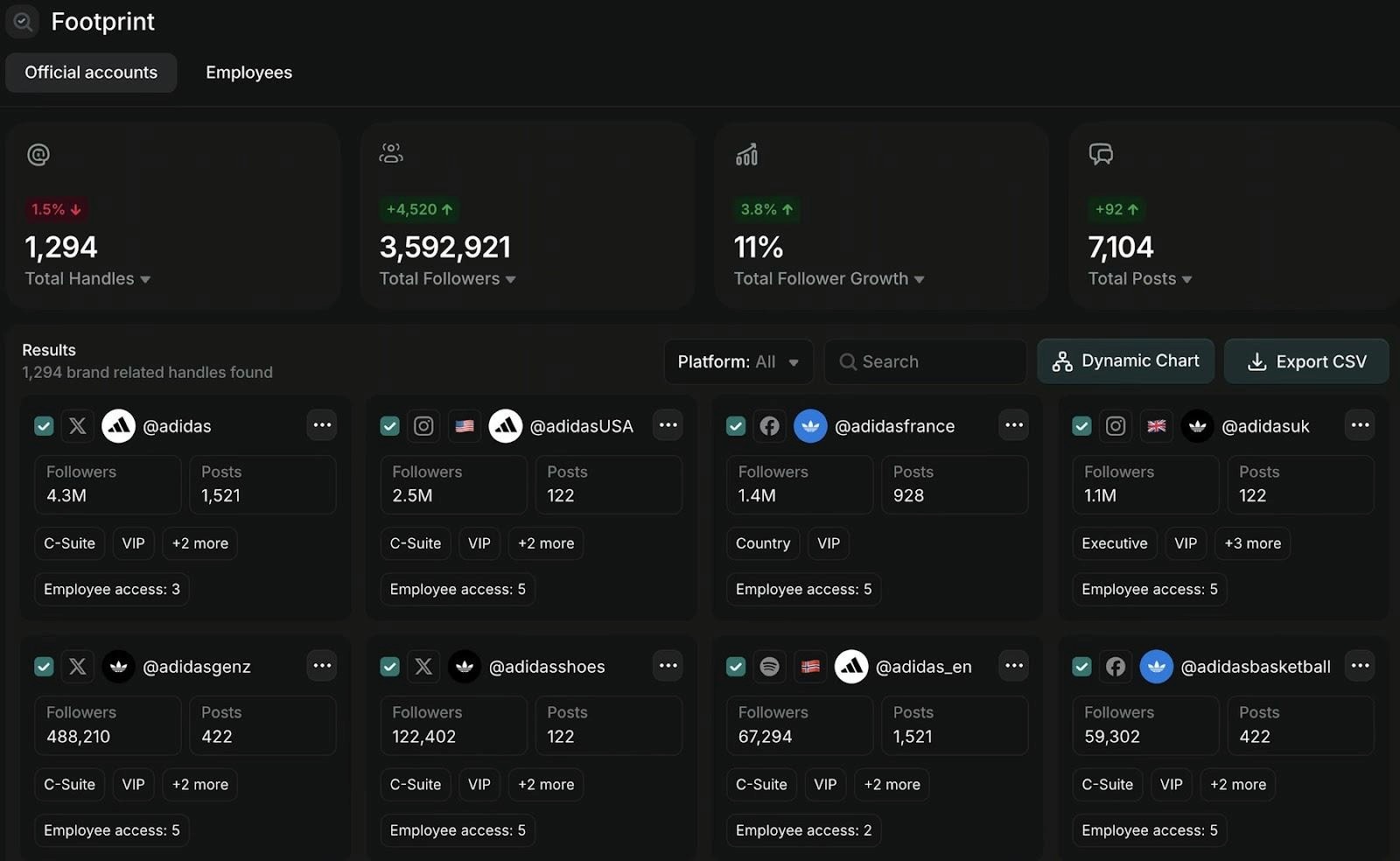
Most teams audit Facebook, Instagram, TikTok, LinkedIn, YouTube, and X separately. As a result, they miss patterns and inconsistencies across platforms. Handles brings every platform into a single unified view, showing exactly who has access to what across your entire social infrastructure.
Automated Compliance Reporting
Handles generates audit-ready reports that document your security posture for compliance reviews. Instead of manually compiling spreadsheets and screenshots when auditors ask questions, you have comprehensive reports showing:
Who has access
When access was granted
Who approved it
What security controls are in place
The report saves you time and resources that you can use for other activities that grow your business.
Vulnerability Alerts
Instead of discovering issues during your next scheduled audit, Handles alerts you immediately when new vulnerabilities appear. The system notifies you when:
Someone adds new admins
Agencies add users to your assets
Security settings change
Impersonators use your brand
This helps you be proactive about your security rather than reactive.
Protect Your Brand With Regular Social Media Security Audits
Social media security incidents happen for many different reasons.
This checklist gives you a complete process for auditing every dimension of social media security, ensuring your brand and audience are safe.
For small organizations, manual audits may work. For enterprises managing complex social footprints across multiple platforms, regions, and teams, Handles Audit provides the automation, visibility, and continuous monitoring that manual processes can't deliver.
Take the next step—contact us to secure your brand on social media.
Quick Summary
A social media security audit is a tool that helps you identify vulnerabilities across your social accounts before they become security incidents. This guide provides a complete checklist for auditing the most risk-prone areas of your social footprint. These include access permissions, unauthorized accounts, reviewing platform security settings, and more. You'll learn how to spot the risks most companies miss and how to use automation to maintain continuous security as your social presence grows.
Do You Need a Social Media Security Audit?
Most companies don't think about social media security until something breaks.
A hacked account posts offensive content.
A former employee still has admin access six months after leaving.
An impersonator scams your customers.
An agency you fired last year can still publish to your Facebook Page.
Nobody knows who has access to what because permissions live across different platforms and outdated spreadsheets.
By the time you discover these problems, the damage is done. Your brand reputation takes a hit. Customers lose trust. Compliance teams start asking questions you can't answer.
The good news? Most social media security incidents are preventable with proper auditing.
This guide walks you through a complete social media security audit checklist, covering every platform, every permission, and every vulnerability that matters in 2026.
Why Listen to Us?
At handles.org, we've helped major brands like Adidas, Framer, and Cohere secure their social media infrastructure. We've audited thousands of accounts, eliminated over 9,000 impersonators for a single client, and built governance systems that prevent security incidents before they happen.
Our Audit tool gives enterprise brands the visibility they need across every social platform, automatically flagging the high-risk vulnerabilities that manual audits miss. And our Radar maps your entire social footprint to surface official accounts and partners. Most importantly, it also reveals impersonators and security risks.

What Is a Social Media Security Audit?
A social media security audit is a systematic review of your organization's social media accounts, access permissions, security settings, and potential vulnerabilities. You should do this across all platforms.
Your audit will help you identify:
Who has access to your accounts and what they can do
Unauthorized or impersonator accounts using your brand
Security gaps in authentication and permissions
Outdated access from former employees or agencies
Platform security settings that need updating
Compliance risks that could trigger regulatory issues
Unlike IT audits that look at servers and networks, a social media security audit focuses on the risks tied to public-facing accounts. These are accounts customers see, may handle sensitive info, and can quickly impact your brand if something goes wrong.
Why Social Media Security Audits Matter
According to IBM, the average cost of a data breach is $4.4M. Social media accounts are among the most exposed and least protected assets in most organizations. Here's why auditing them matters more than ever.
Prevent Brand Damage
One compromised account can publish content that undermines years of brand building. Whether it's a hack, a disgruntled former employee, or an agency mistake, the content goes live instantly and spreads before you can stop it.
Protect Customer Trust
Impersonators and unauthorized accounts scam your customers using your brand name. When people get defrauded by fake accounts, they blame your company even though you didn't create the threat.
Avoid Compliance Violations
Financial services, healthcare, and energy companies face strict regulations about data access and security controls. Social media accounts often hold customer data, targeting information, and communications that fall under compliance requirements. Most teams overlook this aspect.
Stop Financial Fraud
Compromised ad accounts can drain advertising budgets in hours. Unauthorized access to billing information exposes payment methods and spending limits to bad actors who exploit them for financial gain.
Eliminate Single Points of Failure
When one person controls all admin access and leaves the company, you can lose control of critical accounts entirely. This happens more often than companies admit, leading to costly recovery processes and potential legal issues.
Most organizations learn these lessons after an incident. Smart companies audit proactively and prevent problems before they start.
Complete Social Media Security Audit Checklist
Now that you know the importance of a social media security audit, let’s dive into the checklist. We’ve broken it down into different categories to make it easier to use.
Access and Permissions Audit
Your audit should start at the foundation: who has access to what, and do they still need it?
Review All User Accounts
List every person with access to each social media account. Check:
Whether they still work at your company
Whether they still need access for their current role
The permission levels they have
Whether that level matches their job requirements.
Audit Admin and Owner Roles
Identify who has the highest permission levels on each platform. Admin and owner roles should be limited to a small number of trusted individuals, typically senior marketing leaders and IT security staff. Too many admins create security risks.
Check Partner and Agency Access
Review every external organization with access to your accounts. Agencies, contractors, vendors, and partners often retain permissions long after contracts end because no one remembers to revoke them.
Review Role-Based Permissions
For each user, confirm if their specific permissions align with their job responsibilities. A content creator doesn't need billing access. An analyst doesn't need publishing permissions. Over-permissioned accounts create unnecessary risk.
Identify Single Points of Failure
Look for critical accounts where only one person has admin access. This includes ad accounts, Pages, Instagram profiles, and especially billing access. Always have at least two trusted individuals with admin permissions.
Platform Security Settings Audit
Each social platform has security settings that most teams configure once and never review again. Here are some examples:
Two-Factor Authentication
Verify that every account with publishing, advertising, or admin permissions has two-factor authentication enabled. Ensure your organization requires 2FA at the Business Manager (Meta Business Suite for small businesses) or organizational level, not just for individual users, as they can disable it.
Login Alerts
Enable notifications for login attempts from new devices or unusual locations. Doing so can help you catch unauthorized access attempts before they cause damage.
Password Policies
Ensure that passwords follow your organization's security standards. They should be unique to each platform and changed regularly. Also, prohibit password sharing via insecure methods.
Connected Apps and Services
Review all third-party apps and services connected to your social accounts. Includes scheduling tools, analytics platforms, and automation services, as they often have broad permissions that create security vulnerabilities. Remove any connected apps you no longer use.
API Access and Tokens
Check which applications have API access to your accounts and what permissions they hold. Old API tokens from former tools create hidden vulnerabilities that attackers can exploit.
Account and Asset Ownership Audit
Confusion about who owns what causes major problems when people leave or roles change.
Document Asset Owners
For every Page, ad account, Instagram profile, TikTok account, LinkedIn Company Page, and YouTube channel, identify the current owner. This person is responsible for maintaining security, managing access, and responding to issues.
Check Email Addresses
Verify email addresses associated with each of your social accounts. Many organizations discover accounts linked to personal email addresses, former employee email addresses, or generic addresses that go unmonitored.
Review Phone Numbers
Check what phone numbers are registered for account recovery and 2FA. Those tied to former employees or contractors create recovery vulnerabilities.
Audit Billing Access
Review who can view, edit, or control payment methods and billing information. Billing access should be tightly controlled and limited to finance team members and senior marketing leaders.
Brand Protection and Impersonation Audit
Your official accounts are only part of your social footprint. Unauthorized accounts using your brand create significant risks.

Search for Impersonators
Check each social media platform for accounts impersonating your brand. Look for:
Variations of your brand name
Handles with minor changes
Accounts using your logo
Profiles claiming official status
Map Your Complete Footprint
Identify every account that represents your organization, including:
Regional accounts
Product-specific accounts
Employee advocacy accounts
Legacy accounts from acquisitions or rebrands
Check Verification Status
Verify that your official accounts have verification badges where available. Verified status helps customers distinguish real accounts from fakes and provides some protection against impersonation.
Monitor Brand Mentions
Track how your brand is being mentioned across platforms. Unauthorized accounts often tag your official profiles or use your branded hashtags, making them easier to detect through monitoring.
Compliance and Governance Audit
Security isn't just about preventing hacks. It's also about meeting regulatory requirements and documenting internal policies. This is called governance.
Review Data Handling
Check what customer data your social accounts collect, store, or process. This includes data from ads, messages, comments, and integrated tools like pixels and conversion tracking. Ensure your data handling complies with relevant regulations, such as GDPR, CCPA, and others.
Audit Privacy Settings
Review privacy settings for each account and ensure they align with your privacy policies. Check who can see your posts, who can message your accounts, what data you collect from followers, and how you use that data.
Document Access Approval Process
Verify that you have a documented process for granting, reviewing, and revoking social media access. Without documentation, compliance audits become impossible to pass, and security becomes impossible to maintain.
Check Incident Response Plan
Confirm that your organization has an incident response plan specifically for social media security breaches. Most organizations create these plans after their first major incident. Create yours before you need it.
Content and Publishing Audit
The content you publish and how you publish it create security risks that are easy to overlook.
Review Publishing Permissions
Check who can publish content to each account and whether those permissions are appropriate. Not everyone who needs account access needs publishing rights.
Audit Scheduled Content
Review all scheduled posts across platforms and tools. Old scheduled content from former campaigns or employees can be published at inappropriate times, causing embarrassment or worse.
Check Direct Message Access
Identify who can access and respond to direct messages on each platform. DMs often contain customer service issues, sensitive information, or security concerns. As such, they need proper handling.
Cross-Platform Visibility Audit
Most organizations manage each platform independently, creating blind spots and inconsistencies.
Compare Access Across Platforms
Look for patterns in who has access to what. Someone with admin access on Facebook could have similar access on Instagram if they're managing both, but discrepancies often indicate forgotten permissions.
Check for Inconsistent Security
Identify platforms where security settings are weaker than others. If Facebook requires 2FA but TikTok doesn't, you've created an easy target for attackers.
Review Integration Points
Audit how your social accounts connect to other tools. Instagram connected to Facebook, YouTube connected to Google, and cross-posting tools all create additional attack surfaces.
How to Conduct Your Social Media Security Audit
Checking every box on this list manually takes weeks for most organizations. Here's how to approach the process efficiently.
Start With Your Highest-Risk Assets
Begin by auditing accounts with the largest:
Audiences
Highest advertising spend
Access to customer data
Greatest reputational impact
Focus on Facebook Business Manager, Instagram, LinkedIn Company Pages, and any accounts with active paid advertising
Document Everything
Create a spreadsheet or document tracking all:
Users and their permissions
Partner access
Security settings
Impersonators found
Compliance gaps
Action items for fixing issues
Prioritize By Severity
High-priority issues to address first:
Former employees with admin access
Missing two-factor authentication on admin accounts
Billing access that’s controlled by one person
Known impersonators who are actively scamming customers
Orphaned assets without clear owners
Set a Regular Audit Schedule
Enterprise organizations: audit quarterly
Mid-size companies: audit every six months
Small businesses: audit at least annually, with monthly spot checks on access and permissions
How Handles’ Audit Automates Social Media Security
Manual audits may work for small organizations with simple social footprints. But once you're managing multiple platforms, regions, brands, agencies, and hundreds of access points, manual audits become impossible.
This is where Handles steps in. Handles’ mission is to help brands secure, standardize, and optimize their social media presence. The platform does this through:
Continuous Automated Scanning
Handles connects directly to platform APIs and continuously scans your entire social footprint. It automatically discovers all users and permissions, all partner and agency access, all connected assets, all security settings, and all potential impersonators.
Scanning is continuous, and you get alertedtof threats in real time. The system notifies you of permissions changes, giving you constant visibility rather than quarterly snapshots that quickly become outdated.
AI-Powered Risk Detection
Handles doesn't just give you a list of people with access. It uses artificial intelligence (AI) to identify and rank security risks, including:
Former employees still holding permissions
Over-permissioned accounts that create unnecessary exposure
Missing 2FA
Single points of failure
Unauthorized accounts impersonating your brand
Compliance gaps that could trigger regulatory issues
The system ranks risks by severity so security teams know what to fix first. Doing so prevents analysis paralysis that often comes from discovering hundreds of issues at once.
Multi-Platform Unified View

Most teams audit Facebook, Instagram, TikTok, LinkedIn, YouTube, and X separately. As a result, they miss patterns and inconsistencies across platforms. Handles brings every platform into a single unified view, showing exactly who has access to what across your entire social infrastructure.
Automated Compliance Reporting
Handles generates audit-ready reports that document your security posture for compliance reviews. Instead of manually compiling spreadsheets and screenshots when auditors ask questions, you have comprehensive reports showing:
Who has access
When access was granted
Who approved it
What security controls are in place
The report saves you time and resources that you can use for other activities that grow your business.
Vulnerability Alerts
Instead of discovering issues during your next scheduled audit, Handles alerts you immediately when new vulnerabilities appear. The system notifies you when:
Someone adds new admins
Agencies add users to your assets
Security settings change
Impersonators use your brand
This helps you be proactive about your security rather than reactive.
Protect Your Brand With Regular Social Media Security Audits
Social media security incidents happen for many different reasons.
This checklist gives you a complete process for auditing every dimension of social media security, ensuring your brand and audience are safe.
For small organizations, manual audits may work. For enterprises managing complex social footprints across multiple platforms, regions, and teams, Handles Audit provides the automation, visibility, and continuous monitoring that manual processes can't deliver.
Take the next step—contact us to secure your brand on social media.
Social media governance
& Infrastructure.
Social media governance
& Infrastructure.

© 2026 Handles.ai. All Rights Reserved.